THE DIVISION 2 / APPAREL
More caches.
Less tapping.
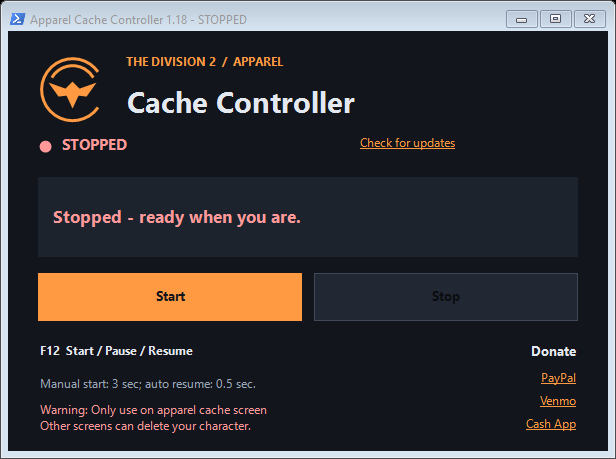
A small Windows app that automates opening and collecting apparel caches in The Division 2. Portable, free, and ready when you are.
Download for WindowsA note about Windows SmartScreen
This app is currently unsigned, so Windows may show “Windows protected your PC.” What the warning means and how to check your download ↓
Wrong screen. Real character deletion risk.
Only start or resume on Start → Apparel → Caches. Never start on character selection, loading screens, or other menus. Holding X and tapping Space on the wrong screen can trigger destructive actions, including deleting your character.
Pause or Stop before leaving Caches, logging out, or changing characters. The app cannot identify the in-game screen. Returning focus to the game can automatically resume input after 0.5 seconds without another confirmation.
GET STARTED
From download to caches.
No installer. No account. Keep the app in a folder you can write to.
- 01
Give it a home.
Download
ApparelCacheController.exeand move it into its own folder, such as one in Documents. Close any other copies, then open the app. - 02
Get on the right screen.
In The Division 2, go to Start → Apparel → Caches. Check the screen before every start or resume.
- 03
Start, confirm, focus.
Click Start, read the warning, and select Yes only when ready. Click back into The Division 2 before the countdown ends. Keep the game focused while opening caches.
- 04
Stop before moving on.
Press F12 or click Pause to pause. Click Stop when finished. Pause or stop before leaving the cache screen.
F12 Start / Pause / Resume
Switch away Automatically pauses
Return to game Can resume after 0.5 seconds
KEEP IT CURRENT
Same little app.
A new home for updates.
The app checks for updates at startup. You can also click Check for updates. Pause or stop first, then accept the update prompt to download, verify, and restart.
Your settings are preserved, and the previous EXE is retained as a backup. The app remains usable when the update server is unavailable.
Downloads now hosted on Cloudflare.
- Initial downloads and update checks now use our own download address.
- Downloads are checked against their expected size, SHA-256 checksum, and app version before replacement.
- The portable app and existing timing settings work as before.
Download this R2 edition manually once—even if your app already says 1.18. Close the old app, replace only the EXE, and keep your existing settings file. Future updates will use the new server.
Version 1.17 also fixed updates reopening the app hidden.
GOOD TO KNOW
A few quick answers.
Why does Windows say “Windows protected your PC”?
This app is currently unsigned and may not have an established download reputation. Microsoft Defender SmartScreen can therefore label it an unrecognized app. That message alone is not a malware detection, and it is not a guarantee that a file is safe.
Download only through this page, using our updates.unmatchedcoatings.com download address. If you want to check the file, the release metadata includes its SHA-256 checksum. A matching checksum confirms it matches the published release; it is not an independent safety assessment.
If you have checked the source and trust the download, select More info → Run anyway, if Windows offers that option. You do not need to turn off Microsoft Defender or SmartScreen. If Windows reports a specific threat instead, stop and investigate that alert before running the app.
Do I need to install anything?
No installation is required. Download the portable Windows EXE and keep it in a writable folder. Its settings file stays beside it.
Does the app know which game screen I’m on?
No. You must check that you are on the apparel cache screen. Start and manual resume require confirmation, but returning to the game can automatically resume input. A warning is not screen detection.
Do I need a GitHub or Cloudflare account?
No account is needed to download or use the app.
How do I check the download?
The release metadata lists the current version, download size, and SHA-256 checksum. The built-in updater verifies these before replacing your app.
BUILT FOR THE GRIND
Helpful? Buy Jeff a coffee.
The app is free. Supporting the project is completely optional.